Client Resources Hub for South West Windscreens & T
Welcome to your dedicated resources landing page.
More resources will be added as you require them.
Latest Report & New Content Strategy
Statergy Report fro AS-SWWT-20 and Content Strategy for AS-SWWT-21
Other resources
A tidy toolkit of simple, friendly documents you can share with colleagues, save to your drive or print for your desk.
Product data template (Excel/Sheets)
Pre‑formatted columns for names, SKUs, descriptions, dimensions and imagery references – perfect for bulk updates or new ranges.
Image & photography guide
Simple rules for getting crisp, consistent imagery that still feels playful – including recommended sizes, crops and background styles.
Copy prompts for product descriptions
A playful worksheet with fill‑in‑the‑blank prompts that help you write clear, on‑brand descriptions without staring at a blank page.
Resources
List of helpful resourses that you may need to access during the time with CLP.
Google Drive Folder
A place for you and your team to load any content or files that we will require.
Click "Access your Google Drive"
If you or your team don't already have access follow the below instuctions.
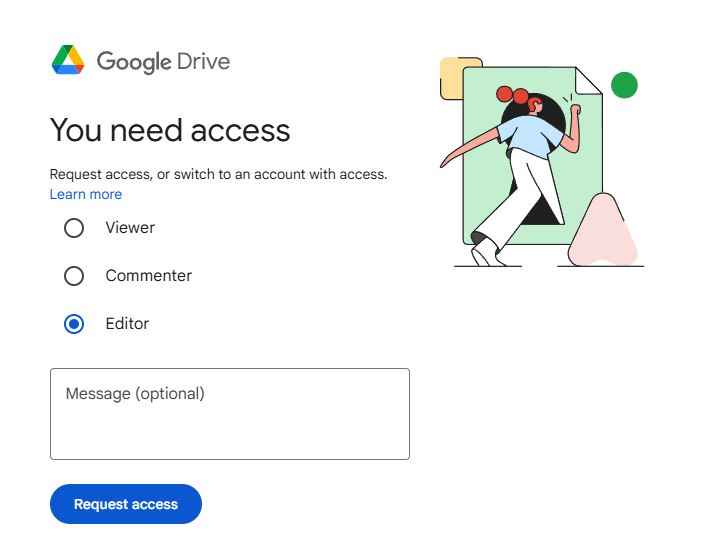
Arrive at the You need access window in Google Drive
Select "Editor"
Type in this code in the message: SWWT314517
Press "Request Access"
Without this code access will be denied. Access will be granted with in 24hours.
Alternitively, you can click Approved Access below and list the emails that are approved to have access to your marketing assetts with CLP.
Product data template (Excel/Sheets)
Pre‑formatted columns for names, SKUs, descriptions, dimensions and imagery references – perfect for bulk updates or new ranges.
Image & photography guide
Simple rules for getting crisp, consistent imagery that still feels playful – including recommended sizes, crops and background styles.
Copy prompts for product descriptions
A playful worksheet with fill‑in‑the‑blank prompts that help you write clear, on‑brand descriptions without staring at a blank page.
Frequently asked questions
A few quick answers so you can keep the site updated without breaking a sweat (or the layout).
What if I update something and it does not look quite right?
Take a screenshot of the page, note the URL and email it to our support team with a short description of what you were trying to do. We will fix the layout, send you a quick explanation and, if helpful, record a short Loom video showing the correct steps for next time.
Can I bulk‑upload lots of products at once?
Yes. Use the product data template in the Resource Library section to organise your information. Once it is complete, send it to us and we will either import it for you or guide your technical team through the import process, depending on your set‑up.
Do I need design skills to change product photos?
No design degree required. As long as your images are clear, well‑lit and roughly match the recommended sizes in the Image & photography guide, the site will handle the rest. If in doubt, send us a small selection and we will advise which work best.
How often should we refresh our product list?
Most clients review their catalogue monthly and do a bigger seasonal tidy‑up every quarter. Whenever you launch a new range, add it to the site at the same time as you brief your sales and marketing teams, so everything feels aligned.
Need a hand with your next update?
We are the marketing agency behind Resources for Clients: Vogue Office Furniture, and we are here to keep things easy. Share your ideas, your messy spreadsheet or even a quick voice note, and we will help translate it into a polished, on‑brand website update.
Email: [email protected]
Response time: within one working day